
Multiple Authentication Schemes with Deep Linking

In Oracle APEX it is possible to use multiple Authentication Schemes for your application. Only one of them can be the current Authentication Scheme, but from the Login page you can link to another Authentication Scheme, for example Social Sign-in, using a button on this page.
An extensive description of how to do this is given by Jon Dixon in his excellent blog post “Two Methods of Setting an APEX Authentication Scheme at Run-Time“, which also explains the option of using a Configuration Procedure. I will limit myself to the method of URL requests.
The essence of this method is that another Authentication Scheme can be applied by calling the URL of the application with an extra parameter “request“, with a value of the form “APEX_AUTHENTICATION=<name_authentication_scheme>“, with <name_authentication_scheme> being the name of the Authentication Scheme you want to apply. Both the current Authentication Scheme and <name_authentication_scheme> need to have the Switch in Session flag set to Enabled.

When the current Authentication Scheme needs to validate the Username and Password in the APEX application, for example the Scheme type “Oracle APEX Accounts“, the application is always redirected to the Login page (which is by default page 9999). On this page, we can now add a second button, that will redirect to the other Authentication Scheme.
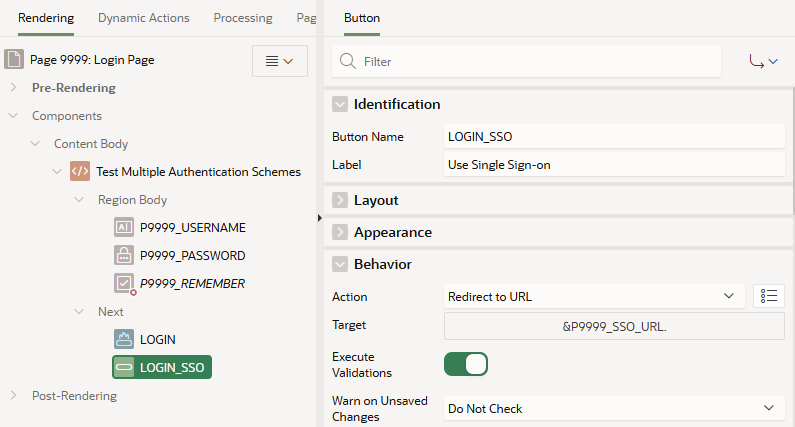
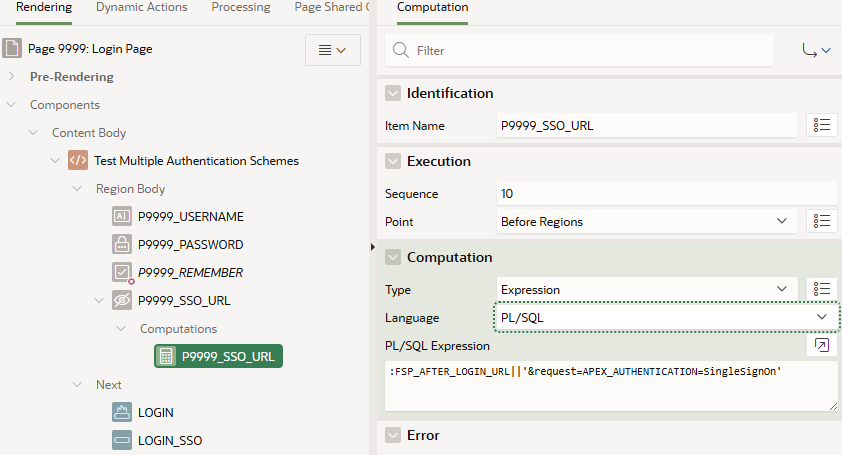
The second button will redirect to a URL that is contained in a hidden page item P9999_SSO_URL. So the last thing to do is to create that page item, and add a Computation to it, type PL/SQL expression, that evaluates to an application URL, with the request “APEX_AUTHENTICATION=<name_authentication_scheme>“ added to it.
We could of course use the Home URL, but when you want to have Deep Linking enabled, you would have to take another approach. Luckily there is an APEX item that can be used to this end, FSP_AFTER_LOGIN_URL. This is the URL that APEX will take you to after login. So the complete Single Sign-On URL wil be (where the name of the second Authentication Scheme is “SingleSignOn“):
:FSP_AFTER_LOGIN_URL||'&request=APEX_AUTHENTICATION=SingleSignOn'
So now when we start the application from page 2, after pressing the “Use Single Sign-on“ button, and logging in through the external identity provider, we are neatly guided to page 2 in our application.
Comments
Join the discussionNo comments yet. Be the first to comment.